Neural Network Quantization Ptq

Disclaimer: This Jupyter Notebook contains content generated with the assistance of AI. While every effort has been made to review and validate the outputs, users should independently verify critical information before relying on it. The SELENE notebook repository is constantly evolving. We recommend downloading or pulling the latest version of this notebook from Github.
Post-Training Quantization
Quantization is an important technique for reducing the memory requirements and computational cost of neural networks, particularly when working with large pretrained models. Instead of representing model parameters and intermediate values using high-precision formats such as FP32 or BF16, quantization maps them to lower-precision representations, such as INT8. This notebook introduces the core ideas behind Post-Training Quantization (PTQ), a method that quantizes an already-trained model without requiring a complete retraining process.
We begin with a brief recap of the fundamental quantization strategies used throughout the notebook. In particular, we revisit asymmetric and symmetric quantization, as well as the role of scaling factors, zero-points, and clipping boundaries. Understanding these concepts is essential because the selected strategy determines how floating-point values are mapped to the limited numerical range of the target data type and directly affects the accuracy of the quantized model.
The notebook then implements the complete PTQ workflow from scratch, without relying on a dedicated quantization library. The implementation is intended for educational purposes rather than practical deployment. Its purpose is to expose the operations that specialized libraries usually hide and to show how floating-point matrix multiplications can be approximated using low-precision integer values. Along the way, we highlight important practical challenges, including outliers, clipping and calibration choices, accumulated quantization errors, additional memory requirements for scaling information, and the potential inference overhead caused by dynamic quantization. By the end of the notebook, you should have a clear understanding of both the mechanics of PTQ and the trade-offs involved in applying it to pretrained neural networks.
Let's get started!
Setting up the Notebook
Make Required Imports
This notebook requires the import of different Python packages but also additional Python modules that are part of the repository. If a package is missing, use your preferred package manager (e.g., or ) to install it. If the code cell below runs with any errors, all required packages and modules have successfully been imported.
from src.utils.libimports.ptq import *
from src.utils.plotting.math import *
from src.utils.formatting.text import *
from src.utils.compute.gpu import *
Output
W0917 16:19:50.912000 205480 site-packages/torch/utils/_pytree.py:630] <enum 'KernelPreference'> is an Enum subclass and is now natively supported by torch.compile as an opaque value type. Calling register_constant() on Enum subclasses is deprecated and will be an error in a future release.
Checking & Setting Computing Device
PyTorch allows to train neural networks on supported GPU to significantly speed up the training process. If you have a support GPU, feel free to utilize it. However, for this notebook it's certainly not needed as our dataset is small and our network model is very simple. We provide an auxiliary method to automatically select the best device. It checks if a supported GPU is available and if so, uses it as the preferred device.
# Select preferred device (GPU, if available; CPU otherwise); you can enfore the use of the CPU
DEVICE = select_device(force_cpu=False)

print("Available device: {}".format(DEVICE))
Output
Available device: cuda:0
---
Recap: Neural Network Quantization
Motivation
Large neural networks such as Large Language Models (LLMs) contain millions or even billions of trainable parameters. Storing each parameter using a high-precision format such as FP32 requires a substantial amount of memory. For example, a model with billions of parameters may require tens or hundreds of gigabytes simply to store its weights, before accounting for activations, intermediate results, or the memory required by the inference process. Memory is therefore often a limited and expensive resource when deploying large models. Quantization addresses this challenge by representing weights and activations with fewer bits, such as INT8 or INT4. This can significantly reduce the model’s memory footprint, lower memory-bandwidth requirements, and enable models to run on smaller or less expensive hardware.
To better see the potential benefits, the table below shows the approximate amount of memory requirements of popular LLMs using different data types for (most of) the weights. However keep in mind that the overall required amount of memory — for inference but particularly for training — goes beyond just storing a learnable model parameters.
| Model Name | Approximate Parameters | Float32 (4 B) | Float16 / BF16 (2 B) | INT8 (1 B) | INT4 (0.5 B) | | --- | --- | --- | --- | --- | --- | | GPT-3 | 175 Billion | ~700 GB | ~350 GB | ~175 GB | ~87.5 GB | | LLaMA 3 (7B) | 7 Billion | ~28 GB | ~14 GB | ~7 GB | ~3.5 GB | | LLaMA 3 (70B) | 70 Billion | ~280 GB | ~140 GB | ~70 GB | ~35 GB | | Mistral 7B | 7 Billion | ~28 GB | ~14 GB | ~7 GB | ~3.5 GB | | Mixtral 8x7B | 47 Billion (Active: ~13B) | ~188 GB | ~94 GB | ~47 GB | ~23.5 GB | | Gemma 2 (9B) | 9 Billion | ~36 GB | ~18 GB | ~9 GB | ~4.5 GB | | Gemma 2 (27B) | 27 Billion | ~108 GB | ~54 GB | ~27 GB | ~13.5 GB | | Qwen 2.5 (72B) | 72 Billion | ~288 GB | ~144 GB | ~72 GB | ~36 GB | | DeepSeek-V3 | 671 Billion (Active: ~37B) | ~2,684 GB (~2.68 TB) | ~1,342 GB (~1.34 TB) | ~671 GB | ~335.5 GB | | Claude 3 Opus | ~500 Billion (Estimated) | ~2,000 GB (~2.0 TB) | ~1,000 GB (~1.0 TB) | ~500 GB | ~250 GB |
Apart from the memory footprint, quantization can also improve inference speed and energy efficiency when the underlying hardware supports low-precision arithmetic. These benefits make it possible to deploy capable LLMs more efficiently and at a larger scale. However, reducing numerical precision can introduce rounding, clipping, and accumulation errors, making it important to understand both the advantages and limitations of different quantization techniques.
Basic Strategies & Challenges
To illustrate how basic quantization works, consider FP32 values as shown in the figure below — and let's assume we want to quantize them to INT8. For example, these values may represent the entries of a weight matrix of a neural network layer.

In the following, we assume we want to map these FP32 values to INT8.
First, let's look at asymmetric quantization which maps the smallest weight (here: ) to the minimum INT8 value , and the largest weight (here: ) to the maximum INT8 value . For this mapping we need to scale and shift the FP32 values such that they occupy the INT8 as well as preserve the overall distribution of values. The figure below shows this mapping.
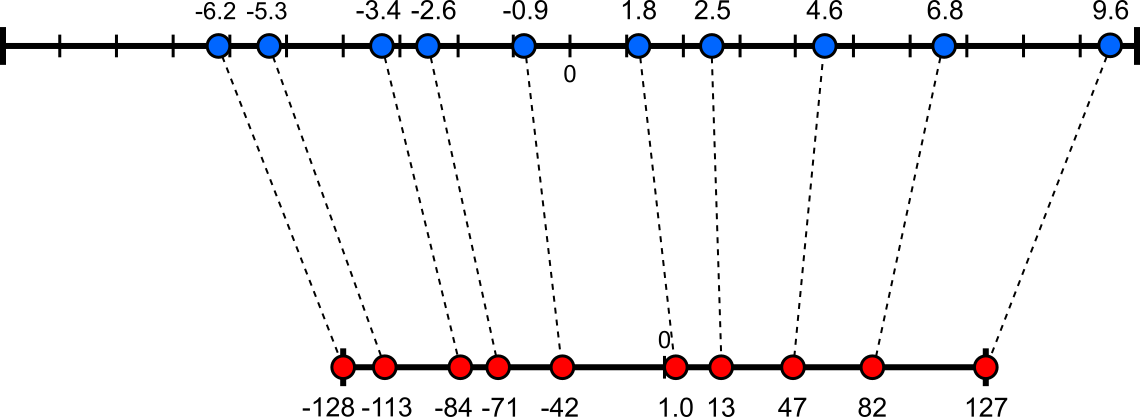
To map each FP32 value to each corresponding INT8 value, we need compute the scaling factor and the zero-point for shifting all values using:
Asymmetric quantization can make optimal use of the target numerical range when the input distribution is shifted or skewed (e.g., when activations are mostly non-negative). By using both a scale and a zero-point, it can map the observed minimum and maximum values more effectively to the available integer levels. However, the nonzero zero-point must be added or subtracted during integer computations, especially matrix multiplications and accumulations. These additional correction terms can complicate optimized hardware kernels and introduce performance or energy penalties
The alternative is symmetric quantization Which does not rely on a zero-point for shifting. In simple terms, symmetric quantization maps in the FP32 space to in the INT8 space — recall that we consider the quantization of an FP32 tensor to an INT8 tensor as an example, but the overall idea remains the same. The figure below shows the resulting mapping for our example data.
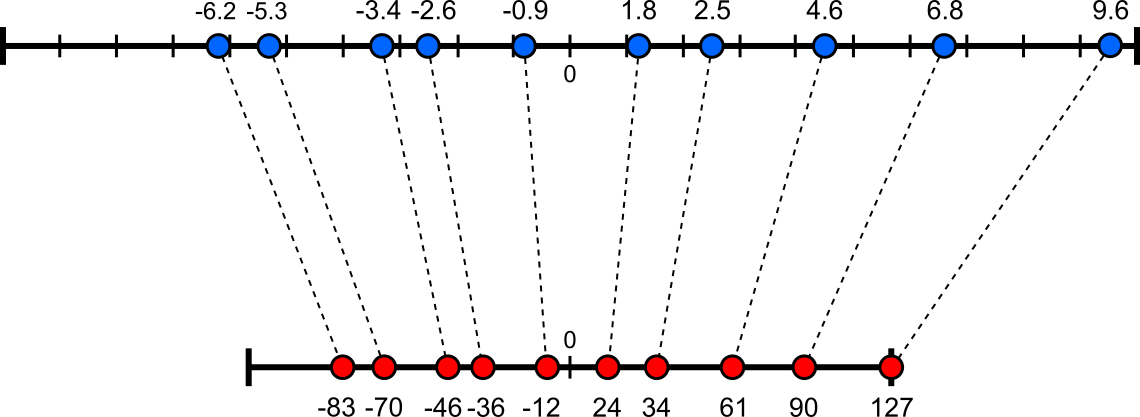
Since we know that know scaling is required (or ), we only need to compute the scaling factor as shown below:
With the scaling factor and the zero-point (which can be for symmetric quantization), we can quantize and the input tensors from to get is quantized version , but the also dequantize it to get reflecting the corresponding mapping from the lower-precision space to the high-precision space; the two respective expression are:
Both asymmetric and symmetric quantization are arguably quite straightforward. However, they are quite susceptible to extreme values (i.e., outlier). To show this, let's assume that the smallest value in our set of FP32 values is now . Since both quantization strategies aim to preserve the distribution of values, the mapping would be very much dominated by that outlier. The figure below illustrates the mapping when using asymmetric quantization; note that the two distributions are not drawn to scale.
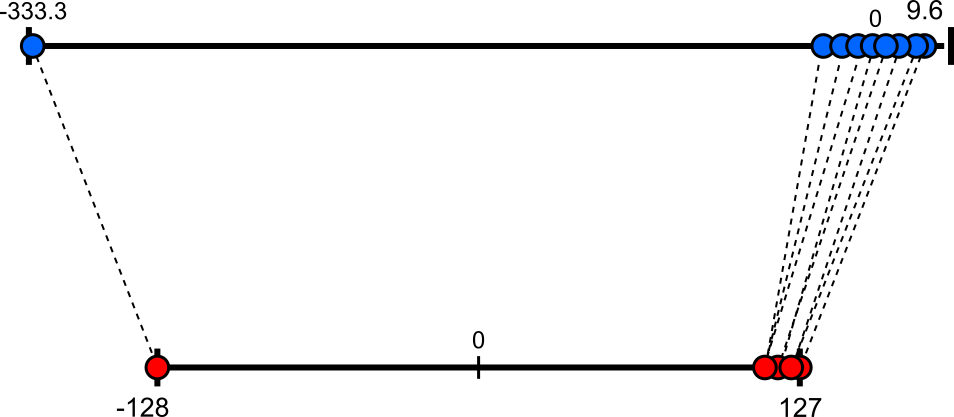
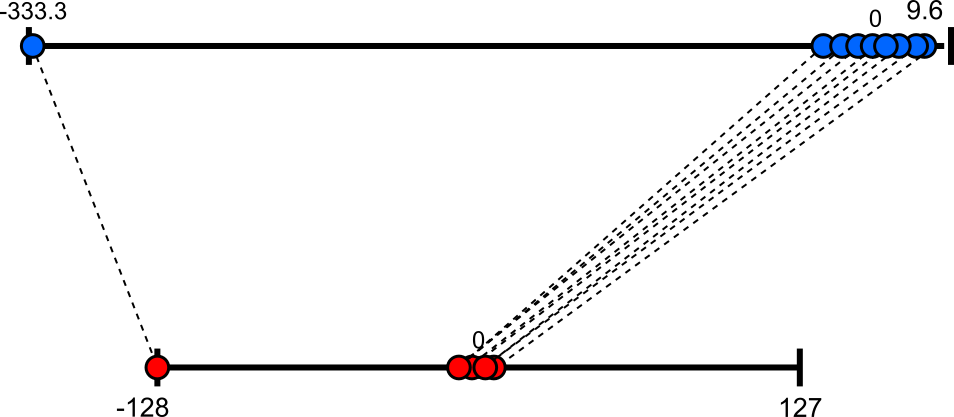
As the outlier is negative, it gets mapped to the minimum INT8 value . All other values get mapped to the very upper end of the numerical range of INT8. In fact, after the quantization, many values there different in FP32 have "collapsed" to the same INT8 value; this did not happen without that extreme value (see above). For symmetric quantization, the effect is the same but even more pronounced and with all non-outliers clumped around ; see the resulting mapping below.
The common solution to address extreme values is clipping (or clamping) which limits values to a predefined range before quantization. Values below the lower bound are replaced by the lower bound, while values above the upper bound are replaced by the upper bound. Clipping prevents a few extreme outliers from determining the quantization scale and consuming a large portion of the available integer range. This improves the precision for the majority of values, but also poses its own challenges, as we will see in the moment. However, deciding on the clipping bounds or thresholds balancing two competing sources of distortion:
Clipping error (saturation): information loss due to extreme outliers being "crushed" into the maximum boundary; this includes that all values beyond the boundaries get clipped to the same boundary value and therefore become indistinguishable (note that in our simple example, we had only one tensor entry outside the clipping boundaries). Quantization error (rounding): precision loss because the step size between adjacent integer bins is too wide; in this case, more non-outliers may become indistinguishable because they get mapped to the same value.
In general, setting the clipping threshold (i.e., the boundaries) too wide causes high quantization noise; setting it too narrow causes high clipping distortion. Finding the sweet spot for the clipping threshold is commonly done by the called calibration, which is generally quite tricky. In fact, in this notebook, we only consider a rather simple clipping approach and show getting clipping right is so difficult.
Types of Quantization
Apart from the basic quantization strategies itself, a very important questions is when quantization is actually performed. The list below briefly outlines the three most common approaches:
Post-Training Quantization (PTQ). PTQ converts a fully trained, high-precision floating-point model (such as FP32) into a lower-precision integer format (such as INT8) after training is completely finished, without requiring model retraining. Its primary advantage is operational simplicity: because it bypasses backpropagation, gradient calculations, and complex training pipelines, developers can quantize a neural network in minutes using only a small representative calibration dataset or simple analytical routines. On the flip side, this means that PTQ only benefits inference not training. PTQ is also rather rigid making it vulnerable to calibration failures and activation outliers.
Quantization-Aware Training (QAT). QAT aims to be less sensitive to outputs not seen during the calibration through training a model using full precision while simulating the effects of quantization. This is typically done through fake-quantization operations which simulates quantization by scaling, rounding, clipping, and scaling back to floating point, allowing the model to experience quantization effects while remaining trainable. QAT can also generalize better to new inputs because the model learns to operate under quantized conditions rather than being calibrated only after training. However, rounding and clipping are not differentiable in the usual sense, which makes direct gradient-based optimization difficult. Furthermore, the simulated quantization noise can make training less stable and may require careful choices of learning rate, initialization, calibration, and training duration.
Quantized Training (QT). Fully Quantized Training attempts to perform the entire training process using low-precision representations. The goal is to reduce training memory consumption, data movement, and potentially energy usage, which could make training large models or performing on-device training more efficient. QT is much more challenging because gradients and parameter updates are often small, highly variable, and sensitive to numerical errors. Rounding can remove important update information, while limited numerical ranges can cause underflow, overflow, or unstable optimization. Consequently, fully quantized training is much less common than PTQ or QAT and mainly investigated when the memory, energy, or hardware benefits of low-precision training justify the additional complexity and potential stability problems.
Of course, the focus of this notebook is on Post-Training Quantization (PTQ).
---
PTQ — Core Mechanics
Main Assumptions for this Notebook
Pretrained model. The most obvious assumption of PTQ is that the model we aim to quantify has been fully trained with high precision. This particularly means that no model parameters (mainly any weights and biases) will change or update any further. To ease presentation of the examples and explanations, we assume that the pretrained model is stored in FP32 and we want to quantize it to INT8. Our from-scratch implementation of PTQ will be more flexible, though.
Focus on linear layers. In general, quantization is typically applied to the layers that contain most of the model's parameters or require the most computation; this mainly includes linear (fully connect) layers and convolutional layers in CNNs. While this may seem limited, keep in mind that other important layer types — such as attention layers or embedding layers — basically consist of (more or less) all linear layers. For example, the multihead attention mechanism in Transformer-based LLMs consists of linear layers to project input embeddings in the query, key and value space, as well as a linear layer to combine the outputs of the multiple heads.
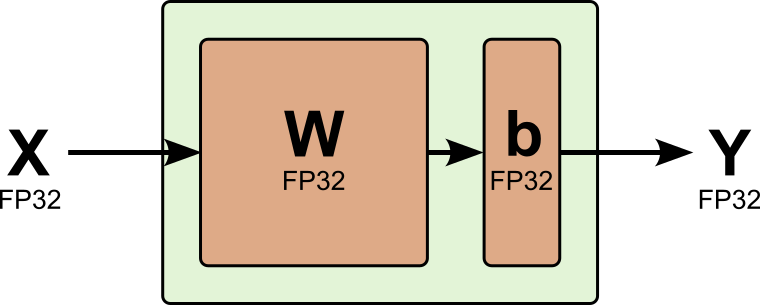
In this notebook, we therefore focus on quantizing a linear throughout all examples and for the from-scratch implementation. Recall that a (standard) linear layer consists of a weight matrix and a bias vector , and performs the following computation during a forward pass:
where is the input — note that this does not have to be the initial input but can be the output (i.e., the activation) from a previous layer — with being the number of samples and the number of features, which is determines the number of inputs of the linear layer. Together with the size of the output of the layer , this determines the dimensions of the weight matrix (i.e., ) as well as of the bias vector (i.e., ). Naturally, the shape of the output is determined by the number of samples and the output size of the linear layer, thus, . To better visualize how qunatization affects the implementation of a linear layer, we can illustrate a standard normal layer (i.e., its input, its learnable parameters, and its output) as shown below.
Side note: In many textbooks or other sources, you may see the alternative expression with . While the underlying math and computations are exactly the same, we favor with here since this is the shape of the weight matrix of a linear layer in PyTorch. This means that our following example will match the outputs of the example implementation later.
Despite working with fully pretrained models and focusing on quantizing linear layer — arguably the most straightforward approach — quantization is still far from a trivial process and requires careful considerations to avoid any significant degradation in model performance. This includes, for example, that the bias is usually not quantized because it contains very few parameters, so quantizing them provides negligible memory savings. At the same time, is added to the accumulated output of a layer and is therefore typically represented in a higher-precision format to preserve accuracy and avoid additional quantization error.
High-precision activations. Lastly, we assume that we dequantize the output of a linear layer before passing it to a subsequent activation function. Activations are often kept in high-precision format such as FP32 because quantization errors can accumulate as they pass through many layers. Activations also have input-dependent and sometimes highly variable ranges, making their quantization parameters harder to determine reliably. In addition, operations such as normalization, residual additions, and nonlinear functions may be sensitive to reduced precision. Different layers can also use different scales, requiring rescaling when their outputs are combined.
However, activations do not always remain in high precision. In optimized inference systems, they are often quantized between layers (commonly to INT8) so that subsequent matrix multiplications can use integer arithmetic. Sensitive operations may still temporarily dequantize them to a higher-precision format. Still, for the context of this notebook, we assume high-precision activations, requiring us to dequantize the output of a linear layer.
Weight Quantization
Let's first consider quantization of the weight matrix . The weights of linear layers often represent the majority of a neural network's learnable parameters because each layer connects many input features to many output features. A linear layer with inputs and outputs contains weight parameters. Consequently, quantizing linear-layer weights can substantially reduce the model's memory footprint and computational cost. We can adjust our simple visual representation of a linear layer accordingly. Apart from weight matrix storing now INT8 values, note that we now also need to dequantize the tensor product ; recall that we keep the bias vector in the original FP32 format. This dequantization step requires additional considerations which we discuss later.
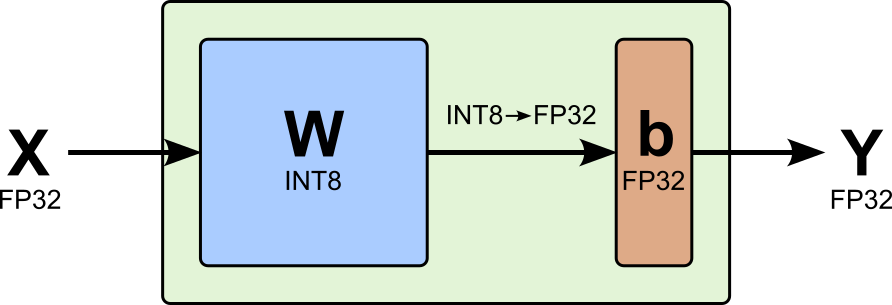
To give an example consider the following weight matrix with and , i.e., this linear layer consists of neurons, each receiving inputs. We assume the inputs to be in a high-precision format such as FP32; the exact values are not important since we do not actually perform any computations.
For all following examples, we assume asymmetric quantization. Its output is arguably a bit easier to interpret since asymmetric makes full use of the numerical range of INT8, we will be able to clearly observe its minimum value and to the quantized results. That being said, symmetric quantization works completely analogously.
When it comes to quantizing weight matrix , there are two common practical approaches: per-tensor weight quantization and per-channel weight quantization.
Per-Tensor Weight Quantization
Per-tensor weight quantization considers all weights together when determining the scaling factor and the zero-point for the mapping from FP32 to INT8. As such, we get a single scaling factor , a single zero-point , and therefore a single mapping as part of the quantization step. At least for our small example matrix, this means that we see and only once the quantized result; shown below.
Storing only a single scaling factor and zero-point makes per-tensor quantization simple and memory-efficient. The quantization parameters require almost no additional storage, and the same parameters can be applied uniformly during quantization and dequantization. However, it implicitly assumes that the weights of each neuron in the layer — each row in the weight matrix have a similar or comparable range. This may often not be the case, thus making an argument for per-channel weight quantization.
Per-Channel Weight Quantization
Weights for individual neurons can have different ranges because each neuron learns a different transformation of the input. The are various factors factors to commonly contribute to this observation:
Different feature roles: Some neurons detect strong or common patterns and require larger weights, while others represent weaker or more specialized patterns. Unequal input-feature scales: If certain input features have larger or more variable values, a neuron may use smaller weights for them, whereas other features may require larger weights. Optimization dynamics: Gradient updates differ across neurons, causing their weights to converge to different magnitudes. Regularization and sparsity: Regularization may affect neurons differently, producing varying weight distributions. Normalization and architecture: Layer normalization, batch normalization, residual connections, and preceding layers influence the scale of the signals each neuron receives and therefore the scale of its learned weights.
Thus, even if the weights within each neuron are approximately normally distributed, the normal distributions may have different means and variances. Per-channel quantization accommodates these differences more effectively than one global (i.e., layer-wide) scale. This means that we now quantize each row in individually, resulting in scaling factors and zero-points, one pair of values for each neuron. The matrix below shows the result of per-channel quantization for our example weight matrix — notice that we see and now in each row.
The obvious downside of this approach is that we now have to store scaling factors and zero-points; although, compared to the weight parameters, this number is generally not a problem. However, depending on use of any specialized hardware, per-channel quantization may introduce some performance penalty — even though the implementation of per-tensor and per-channel quantization "looks" basically the same in PyTorch (see below), the execution on the hardware level in terms of performance can differ noticeably.
Activation Quantization
Compared to the weights in matrix , the activations — which we assume to be in a high-precision format (see above) — from a previous layer forming input are not static but change for each initial input. One the one hand, since activations are computed dynamically during inference, they are not part of the model's permanent storage footprint. Nevertheless, quantizing activations can make inference more efficient by enabling integer-based matrix multiplications with quantized weights. This can reduce computational cost, memory bandwidth, and temporary activation memory, often improving throughput and energy efficiency. The figure below illustrates the addition of quantizing the activations to a linear layer.
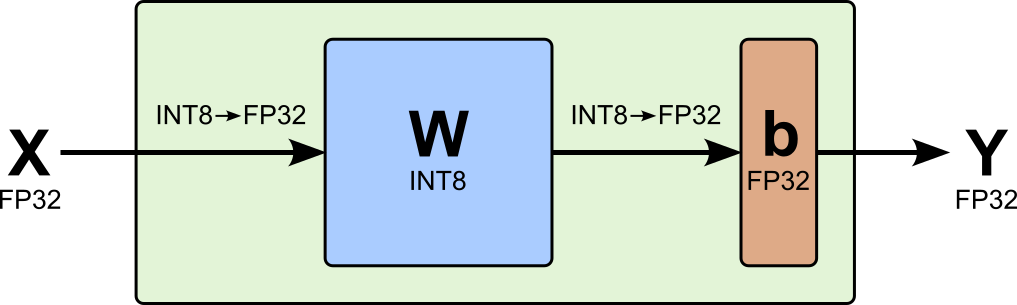
Since we do not know how the activations will exactly look like, there are two common strategies for quantizing activations: dynamic quantization and static quantization. The process of mapping the activations from, say, FP32 to INT8 remains the same. The difference derives when (and how often) the quantization parameters (i.e., the scaling factor and zero-point are computed).
Dynamic Quantization
Dynamic activation quantization determines the quantization parameters at runtime from the current activation values. This means that for each activation tensor , the system computes its range, derives a scale and zero-point, and then quantizes it before matrix multiplication . In other words, while weights have been quantized ahead of time, the activations are quantized separately for each input, batch, or operation.
The advantage of dynamic quantization is that the quantization range adapts to the current input. On the other hand, dynamic activation quantization introduces runtime overhead because the range, scale, and zero-point must be computed for each input or operation. Changing quantization parameters can complicate hardware execution and reduce performance, while outliers may widen the range and decrease effective precision. The resulting input-dependent scales can also make performance and numerical behavior less predictable across batches or sequence positions.
Overall, dynamic quantization is convenient (incl. its rather straightforward implementation) and often robust, a commonly a proper choice if hardware efficiency is not the absolute main goal. In fact, for our implementation from scratch do consider dynamic quantization — but keep the implementation flexible enough to support static quantization (see next) as a natural extension.
Static Quantization
Static quantization computes the scaling factor and the zero-point only once, and uses both parameters to quantize any incoming activations . Its main advantages are lower runtime overhead, predictable execution, and better compatibility with optimized integer hardware. The challenge is of course computing meaningful values for and . Recall that both values depend on and , which will generally vary for different inputs.
Finding and is done using the process of calibration where the trained model is given as set test inputs and the system observes the resulting activation values. These samples provide information about the typical distribution and range of activations at each layer. This information is then used to determine fixed quantization parameters and that represent the activations accurately during inference. While the process itself is generally quite straightforward, it requires that the calibration data does reflect the inputs the model will encounter in practice well; otherwise the computes values for and will perform poorly.
Clipping
We saw in the recap section how extreme value (i.e., outliers) can negatively affect the computation of the scaling factor and the zero-point — both for quantizing weights and activations — thus resulting in a suboptimal or even bad quantization result. The common strategy to address extreme values is clipping, which limits the original values to a chosen minimum and maximum before quantization. However, we saw that finding these clipping boundaries is a balancing act between minimizing the clipping error (saturation) and the quantization error (rounding); see above (recap section).
The table below provides a brief overview of common strategies to identify good clipping boundaries. Apart from basic strategies such as min-max clipping and percentile clipping, more sophisticated strategies rely on learning various statistics or other parameters from the data, which is also considered part of the calibration process.
| Clipping strategy | How it works intuitively | | ------------------------------------ | ----------------------------------------------------------------------------------------------------------------------------------------------------------------- | | Min–max clipping (no clipping) | Uses the observed minimum and maximum values as the quantization boundaries. This preserves all values but makes the scale sensitive to outliers. | | Percentile clipping | Sets the boundaries at chosen percentiles, such as the 0.1th and 99.9th percentiles, and clips the most extreme values. | | Standard-deviation clipping | Sets the boundaries around the mean, for example , assuming that most values lie within a few standard deviations. | | Mean absolute deviation clipping | Uses the mean and the average absolute deviation to estimate a representative range, making it somewhat less sensitive to extreme values than standard deviation. | | MSE-based clipping | Tests different clipping ranges and selects the one that minimizes the mean-squared error between the original and quantized values. | | KL-divergence clipping | Compares the original activation distribution with the quantized distribution and chooses the range that minimizes their KL divergence. | | Entropy-based clipping | Selects boundaries that preserve as much information as possible according to an entropy-based measure. It is closely related to KL-divergence calibration. | | Moving-average clipping | Tracks activation ranges over multiple batches using a moving average, producing more stable boundaries than relying on a single batch. | | Running-percentile clipping | Estimates percentiles across multiple batches and updates the clipping boundaries gradually, combining outlier rejection with calibration stability. |
Clipping calibration is often a very tricky process in practice. A deep dive into various strategies is far beyond the scope of this paper. We therefore limit ourselves to simple percentile clipping. While easy to implement, it already provides some insights into how sensitive the trained model to quantized can be in the case of poor choices for the clipping boundaries.
Matrix Multiplication
Recall that a linear layer has to compute towards its final output. However, due to quantization — using the expression for dequantization — we now approximate both tensors as follows:
Note that we write / and / to denote the different scaling factors and zero-points for the activations and the weights. Substituting both expressions, we get:
In other words, to get our approximation for , we first need to subtract the respective zero-points from the quantized activations and weights before computing the matrix/tensor product; at lastly, we need to divide by the product of both scaling factors to get the final approximation.
---
Implementation from Scratch
Now that we have a better understanding of how Post-Training Quantization (PTQ) works, let's actually implement it. To this end, we implement all the core steps in PyTorch — in the next section, we will actually load a pretrained PyTorch model, quantize it using our implementations, and compare its new memory footprint as well as its performance.
Recall that we limit ourselves to linear layers. In PyTorch, linear layers are implemented using the nn.Linear class, which encapsulates both the layer's weight matrix and its bias vector. When applying quantization, we are typically interested only in the weights; see above. These can be extracted as a PyTorch tensor using layer.weight.data, allowing the weight matrix to be inspected or quantized independently of the bias.
To test our implementions, let's create a linear layer and extract the weight matrix as a tensor. The nn.Linear class expects two main arguments: the number of input features infeatures and the number of output features outfeatures, with the latter corresponding to the number of neurons in the layer. These values determine the dimensions of the layer's parameters: the weight matrix has shape (outfeatures, infeatures), while the bias is a vector with shape (outfeatures,). These variable names in PyTorch reflect and in our previous theoretical discussion. In the code cell below, we create a linear layer for outputs and inputs.
torch.manual_seed(42)

# Create linear layer
linear_layer = nn.Linear(4,5).to(DEVICE)

# Extract weight matrix as tensor
W = linear_layer.weight.data
We can confirm the shape as well as the data type (dtype) of the weight matrix using:
print(f"Shape of weight matrix: {W.shape}")
print(f"Dtype of weight matrix: {W.dtype}")
Output
Shape of weight matrix: torch.Size([5, 4])
Dtype of weight matrix: torch.float32
Notice that the default datatype of PyTorch tensors is FP32 (torch.float32).
When testing our implementation of quantization, it is actually very useful to look at the actual values. While we can just print(W) for that, the output looks not very clean and, by default, will not show the full precision of the values in the tensor. We therefore provide the auxiliary method drawmatrix() to visualize a -dimensional tensor (i.e., a matrix) or a -dimensional tensor (i.e., a vector) as a clean LaTeX rendering.
draw_matrix(W)Output
<IPython.core.display.Latex object>
As mentioned before, we consider the use case where we want to quantize an FP32 data (weights or activations) to INT8. However, we aim to make our implementation a bit more flexible by specifying the target data type. Conveniently, PyTorch provides the methods torch.iinfo() and torch.finfo() for information about the numerical properties of integer and floating-point data types, respectively. Given a data type such as torch.int8 or torch.float32, torch.iinfo() reports the minimum and maximum representable integer values, while torch.finfo() provides details such as the smallest and largest representable floating-point values, machine epsilon, and numerical precision. These methods are useful when designing or implementing numerical operations such as quantization, because they help determine the valid range and precision of a target data type.
The method getdtypeinfo() wraps both torch.iinfo() and torch.finfo() for a more convenient use.
def get_dtype_info(dtype):
    try:
        return torch.iinfo(dtype)
    except Exception as e:
        return torch.finfo(dtype)
Let's test this method to find the number of bits , as well as the minimum and maximum possible value of INT8.
int8_info = get_dtype_info(torch.int8)

print(f"Number of bits: {int8_info.bits}")
print(f"Minimum value:  {int8_info.min}")
print(f"Maximum value:  {int8_info.max}")
Output
Number of bits: 8
Minimum value:  -128
Maximum value:  127
With our example weight matrix W and the auxiliary method getdtypeinfo() we can now implement quantization step by step.
Percentile Clipping
Quantile clipping for quantization limits a tensor’s values to percentile-based boundaries before mapping them to the target numerical range, reducing the influence of outliers and often improving the representation of the majority of values. In asymmetric quantization, the lower and upper clipping thresholds can be selected independently (e.g., the -th and -th percentiles) so the available range is adapted to the actual distribution. In symmetric quantization, the clipping range is centered around zero, typically by choosing a threshold based on a high quantile of the absolute values and using [-threshold, threshold].
The implementation of method cliptensor() in the code cell below handles both asymmetric and symmetric cases, using the built-on method torch.quantile of PyTorch. By default, we clip the input tensor using percentile=1.0 (i.e., the -th percentile), which simply means that we do not perform any clipping at all. Inconsiderate clipping can severely degrade a model's performance, so "no clipping" is a good default value.
def clip_tensor(x, symmmetric=False, percentile=1.0):
    if symmmetric == False:
        lower = torch.quantile(x.detach().float().reshape(-1), 1-percentile)
        upper = torch.quantile(x.detach().float().reshape(-1), percentile)
        return torch.clamp(x, min=lower, max=upper)
    else:
        threshold = torch.quantile(x.detach().float().abs().reshape(-1), percentile)
        return torch.clamp(x, min=-threshold, max=threshold)
However, for a quick test, let's clip our example weight matrix using the -th percentile, just so that the effects are easy to observe in the output tensor.
W_clipped = clip_tensor(W, percentile=0.8)

draw_matrix(W_clipped)
Output
<IPython.core.display.Latex object>
Now, after clipping, we can see that multiple occurrences of the new smallest values of and multiple occurrences of the largest values because we mapped our values outside this range to these two boundary values. In practice, we chose percentile to be a very high value close to so as to only remove truly (very) extreme outliers.
Asymmetric & Symmetric Quantization
We split the actual quantization into its two steps: (a) computing the scaling factor and the zero-point, and (b) using these parameters to actually convert the high-precision values to their lower-precision format. The reason for this 2-step implementation will be clearer when we implement a quantized version of a linear layer.
Scaling Factor & Zero-Point
For computing the the scaling factor and the zero-point , the method getscaleandzeropoint directly implements the corresponding expression for and we have seen before, for both asymmetric and symmetric quantization. Beyond that, the method implements two extensions:
Per-tensor vs per-channel quantization. The method supports both per-tensor and per-channel quantization. If channeldim=None (default), the method performs per-tensor quantization, in which case and are individual values. If channeldim=0 — recall that the first dimension of the weight matrix reflects or outfeatures — the method performs per-channel quantizations; here, and are now vectors with elements representing the scaling factors and zero-points for each channel.
Safety checks. Since computing the scaling factor requires to divide by a value that might be . In the case of asymmetric quantization, if all values in the input tensor are the same (incl. all s), in case of symmetric quantization if all values in the tensor a . While rare, this can happen if, for example, a previous layer computed only negative values and after all values are capped at . To avoid a division by , these cases are checked and in which case the scaling factor is set to ; or to a vector with all s for per-channel quantization.
def get_scale_and_zeropoint(x, quant_dtype=torch.int8, symmetric=False, channel_dim=None):

    # Get range of target data type for quantization (i.e., b = number of bits)
    b = get_dtype_info(quant_dtype).bits

    if channel_dim is None:
        reduce_dims = tuple(range(x.ndim))
    else:
        reduce_dims = tuple(dim for dim in range(x.ndim) if dim != channel_dim)

    x_min = x.amin(dim=reduce_dims, keepdim=True)
    x_max = x.amax(dim=reduce_dims, keepdim=True)

    # Check if symmetric quantization is specified
    if symmetric == False:
        # Compute scaling factor and zero-point
        s = torch.where(x_max==x_min, torch.tensor(1.0, device=x.device), ((2**b - 1)/(x_max - x_min))).to(torch.float32)
        z = -torch.round(x_min * s) - 2**(b-1)
    else:
        # Compute absolute maximum
        max_abs = torch.maximum(x_min.abs(), x_max.abs())
        # Compute scaling factor; we know z=0
        s = torch.where(max_abs == 0, torch.tensor(1.0, device=x.device), ((2**b - 1)/(2*max_abs)))
        z = torch.tensor(0, dtype=torch.int32, device=x.device).to(torch.float32)

    # Return scale and zero-point
    return s, z
Let's perform two runs to test the method getscaleandzeropoint. First, we consider asymmetric and per-tensor quantization.
scale, zero_point = get_scale_and_zeropoint(W, symmetric=False, channel_dim=None)

print(f"Scaling factor: {scale}")
print(f"Zero-point:     {zero_point}")
Output
Scaling factor: tensor([[308.6720]], device='cuda:0')
Zero-point:     tensor([[-15.]], device='cuda:0')
As expected, we can see that the zero-point is not (although this could happen by chance) and that both the scaling factor are zero-point are individual values — strictly speaking both values a tensors but they are treated as scalar values when used in operations; this is the result of supporting both per-tensor and per-channel quantization.
Let's therefore see an example for using getscaleandzeropoint() when assuming per-channel quantization by setting channeldim=0; recall that the first dimension of the weight matrix reflect the output size of the layer, i.e., the number of channels.
scale, zero_point = get_scale_and_zeropoint(W, symmetric=False, channel_dim=0)

print(f"Scaling factors:\n{scale}\n")
print(f"Zero-points:\n{zero_point}")
Output
Scaling factors:
tensor([[442.3690],
        [474.7995],
        [315.7560],
        [579.5455],
        [412.0461]], device='cuda:0')

Zero-points:
tensor([[-76.],
        [-12.],
        [-12.],
        [-87.],
        [-32.]], device='cuda:0')
We now see that both and are vectors, each having values representing the scaling factor and zero-point for each channel.
Value Mapping
For the actual quantization, i.e., the mapping of the high-precision values to the lower-precision values and back, we implement the two methods quantizetensor() and dequantizetensor() using the provided scaling factor(s) and zero-point(s) as shown in the code cell below. Both methods are very simple since they only need to implement the expression for and as we have seen in the recap section.
The only addition in the quantizetensor() is to add a safety step: due to the rounding operation the resulting value might happen to one unit above the maximum value or below the minimum value. For example, the largest value in the original tensor might map to which is not within the valid range of INT8. Thus, to prevent this, we simply clamp the output tensor so that no value goes beyond the numerical range of INT8 — or any other specified target data type. Conveniently, we can simply use the built-in method torch.clamp() for that.
def quantize_tensor(x, scale, zero_point, quant_dtype):
    # Get minimum and maximum possible value for quant_dtype
    dtype_info = get_dtype_info(quant_dtype)
    q_min, q_max = dtype_info.min, dtype_info.max
    # Quantize and clamp tensor (to avoid "rollover") issues
    return torch.clamp(torch.round(x*scale) + zero_point, q_min, q_max).to(quant_dtype)

def dequantize_tensor(x, scale, zero_point, dequant_dtype):
    # Dequantize and return tensor
    return ((x - zero_point) / scale).to(dequant_dtype)
To illustrate the complete quantization step (well, here without clipping), the code cell below performs asymmetric, per-tensor quantization to convert our example weight matrix (i.e., tensor) from FP32 to INT8; feel free to change the code to also try symmetric and/or per-channel quantization. The output generated by the code snippet shows the original tensor, its quantized version, as well as its dequantized version for a direct comparison with the original input.
# Compute scaling factor and zero-point
scale, zero_point = get_scale_and_zeropoint(W, quant_dtype=torch.int8, symmetric=False, channel_dim=None)

# Quantize input tensor
W_quant = quantize_tensor(W, scale, zero_point, torch.int8)

# Dequantize tensor
W_dequant = dequantize_tensor(W_quant, scale, zero_point, torch.float32)

print(f"Original tensor:")
draw_matrix(W)
print(f"\nQuantized tensor:")
draw_matrix(W_quant)
print(f"\nDequantized tensor:")
draw_matrix(W_dequant)
Output
Original tensor:
<IPython.core.display.Latex object>
Quantized tensor:
<IPython.core.display.Latex object>
Dequantized tensor:
<IPython.core.display.Latex object>
When comparing the original tensor (i.e., the weight matrix of the linear layer) with the dequantized tensor, we can see that their values are very similar but not identical. This is no surprise, of course, since quantization will — ignoring very unlikely special cases — involve some loss of information which cannot fully be reconstructed during dequantization. However, recall the core assumption of quantizing neural networks, the over-parameterized nature of large networks can compensate for these minor differences in precision.
Quantized Linear Layer
Unfortunetely, quantizing a layer, even just a simple linear layer, is not just quantizing its weight matrix; recall that we typically keep the bias at a high precision. More specifically, we require two additional functionalities:
Quantize activations. The input of the linear layer is typically the activations from a previous layer, which we assume are in high-precision format such as FP32. While we do not have to quantize the activations to get the layer output, we typically want to so we can take advantageof the accelerated integer matrix operations provided by suitable hardware.
Dequantize output. Again, in line with our assumption and design decision, we want that the final layer output is a high-precision format before passing it to the activation function or any other next layer. This means that we must dequantize the result of the integer operations.
In other words, we cannot simple change the linear layers of a pretrained model by only quantizing their weight matrices, we actually need to replace the linear layer with a qunatization-enabled implementation. And this is exactly what the class LinearQuantized is for. Fundamentally, it mimics the structure of functionality of the built-in nn.Linear class so it can serve as a drop-in replacement when quantizing a pretrained PyTorch model. Of course, LinearQuantized adds all the core functionality required to support quantization.
Have a look at the implementation of class LinearQuantized to see if you can comprehend its structrue and functionality; this is a good exercise since all the core steps performed by this class have been discussed above. However, for some more explanation of the code, we highlight some important details below.
class LinearQuantized(nn.Module):

    def __init__(self, in_features, out_features, bias, weight, weight_scale, weight_zero_point, quant_dtype=torch.int8, channel_dim=None, symmetric=False):
        super().__init__()

        self.in_features = in_features
        self.out_features = out_features
        self.quant_dtype = quant_dtype
        self.symmetric = symmetric
        self.channel_dim = channel_dim

        # Quantized weights
        self.register_buffer("weight", weight)
        self.register_buffer("weight_scale", weight_scale.detach().clone())
        self.register_buffer("weight_zero_point", weight_zero_point.detach().clone())

        # Bias is usually kept in FP32
        if bias is not None:
            self.register_buffer("bias", bias.detach().float())
        else:
            self.bias = None

        # Activation parameters can later be replaced by calibrated values
        self.activation_scale = None
        self.activation_zero_point = None


    @classmethod
    def from_float(cls, linear_layer, quant_dtype=torch.int8, symmetric=False, channel_dim=None, clip_percentile=1.0):
        # Get weight matrix (tensor) of linear layer
        x = linear_layer.weight.detach().float()

        # Perform percentile clipping
        x_c = clip_tensor(x, symmmetric=symmetric, percentile=clip_percentile)

        # Quantize weight matrix
        weight_scale, weight_zero_point = get_scale_and_zeropoint(x_c, quant_dtype=quant_dtype, symmetric=symmetric)
        weight = quantize_tensor(x_c, weight_scale, weight_zero_point, quant_dtype)

        # Get bias from linear layer, if present; do not quantize it
        bias = (linear_layer.bias.detach().float() if linear_layer.bias is not None else None)

        # Return instance of LinearQuantized class
        return cls(
            in_features=linear_layer.in_features,
            out_features=linear_layer.out_features,
            bias=bias,
            weight=weight,
            weight_scale=weight_scale,
            weight_zero_point=weight_zero_point,
            quant_dtype=quant_dtype,
            symmetric=symmetric,
            channel_dim=channel_dim
        )


    def forward(self, x):
        original_shape = x.shape

        # Flatten all dimensions except the final feature dimension
        x_2d = x.reshape(-1, self.in_features)

        # Dynamically quantize activations if no calibration parameters have been provided.
        if self.activation_scale is None:
            x_scale, x_zero_point = get_scale_and_zeropoint(x_2d, quant_dtype=self.quant_dtype, symmetric=self.symmetric)
            #x_q = quantize_tensor(x_2d, x_scale, x_zero_point, self.quant_dtype)
        else:
            # Set scaling factor and zero-point based on available (precomputed/calibrated) values
            x_scale = self.activation_scale
            x_zero_point = self.activation_zero_point

        # Quantize activations
        x_q = quantize_tensor(x_2d, x_scale, x_zero_point, self.quant_dtype)


        # Convert to INT32 before subtracting zero-points
        x_centered = (x_q.to(torch.int32) - x_zero_point)
        w_centered = (self.weight.to(torch.int32) - self.weight_zero_point)

        # INT32 accumulation
        accumulator = x_centered @ w_centered.t()

        # Dequantize matrix/tensor product
        output = accumulator.float() / (x_scale * self.weight_scale)

        # Add bias (if avaiable)
        if self.bias is not None:
            output = output + self.bias

        output_shape = original_shape[:-1] + (self.out_features,)

        return output.reshape(output_shape).to(x)
Let's go over some interesting details of this implementation, starting the init() method:
The class uses the built-in method registerbuffer() to add all tensors (weight matrix, bias vector, scaling factor, zero-point) as a persistent, non-trainable state variable. Unlike a parameter, a registered buffer is not updated by gradient descent, but it is automatically included in the module’s statedict() and moved to the appropriate device when calling methods such as .to("cuda"). This makes it useful for storing tensors that are part of a model's state without treating them as learnable parameters. After all, we assume a pretrained model with all learnable parameters being static.
An instance of nn.Linear may be created with bias=True, meaning that this linear layer does not feature a bias vector. Our LinearQuantized has to accommodate for this case and only register an bias vector if one is indeed present.
We define the class variables activationscale and activationzeropoint (but set them both to None) to prepare the implementation for the static calibration of the scaling factor and zero-point when quantizing the activations. However, as mentioned earlier, in this notebook, we only implement dynamic quantization, meaning that we quantize all activations on the fly — that is, we compute the scaling factor and zero-point for each in put individually during the forward pass.
Notice that we only have a single argument symmetric=False. As such, we perform either asymmetric or symmetric quantization for both the weight matrix and the activations. This is simply to keep the code a bit simpler, but we can easily extend it to use different quantization strategies for the weight matrix and the activations.
The class method fromfloat() is an auxiliary method that takes in an instance of nn.Linear to create an instance of LinearQuantized by copying over the weight matrix and the (optional) bias vector. Of course the weight matrix is not directly copied over but first clipped (using the method cliptensor()) and quantized (using the methods getscaleandzeropoint() and quantizetensor()). The arguments of method fromfloat() allow to specify the target data type (e.g., INT8), the quantization strategy, per-tensor vs. per-channel quantization, and the clipping percentile.
The main work is done in the forward() method as it has to handle all the dynamic quantization and dequantization steps. While all the steps are quite straightforward, there some implementation details that are worth mentioning:
nn.Linear accepts inputs with shape , where $$ represents any number of leading dimensions and the final dimension contains the input features. Since the linear transformation operates independently on each leading entry, the input can be flattened across all dimensions except the last one before performing the matrix multiplication; we can use the built-in method reshape() to accomplish this. Afterward, the output can be reshaped back to the corresponding leading dimensions, with the final dimension replaced by ; see below.
The method checks if it needs to perform dynamic quantization of the activations (self.activationscale is None) static quantization. In case of dynamic quantization, we use the method getscaleandzeropoint() to compute the scaling factor and the zero-point for the activations like we did for the weight matrix; in case of static quantization, we already have and through self.activationscale and self.activationzeropoint. In both cases, we can then use quantizetensor() to transform the tensor from FP32 to INT8 (or any other specified target data type)
Recall that before the matrix/tensor multiplication we first have to subtract the corresponding zero-points from the activations and weights, giving us the centered activations and centered weights. For the multiple itself, we also have to consider that many values resulting from the product are outside the numerical range of INT8. We therefore need to cast the centered activations and the centered weights to a data type with a higher numerical range like INT32 in the code above. After the multiplication, we need to divide by the product of both scaling factors to get our approximation for . If we have a bias, we need to add it.
Lastly, we need to restore the original shape with respect to all dimensions except the last. Recall that we except is input, so we need to ensure an output shape of — important: while $$ represents any number of leading dimensions, they have to be the same in and
We can test our implementation by first creating an instance of LinearQuantized using the method fromfloat() applied to our example linear layer we created at the beginning. We can the look at the weight matrix of the quantized linear layer which should match the quantized tensor we have seen in previous examples.
linear_quantized = LinearQuantized.from_float(linear_layer, quant_dtype=torch.int8, symmetric=False, channel_dim=0, clip_percentile=1.0).to(DEVICE)

draw_matrix(linear_quantized.weight)
Output
<IPython.core.display.Latex object>
Model Quantization
As mentioned earlier, quantizing a pretrained model generally does not just mean to change existing layers but to replace them with quantization-enabled drop-in replacements — such as instances of our LinearQuantized class. To automate this process, the replacelinearlayers() takes in a pretrained PyTorch model, iterates through all layers, and for each instance of nn.Linear it performs the following two steps:
Create an instance of LinearQuantized with the same weights and biases Replace the nn.Linear instance with its LinearQuantized counterpart
def replace_linear_layers(model, quant_dtype=torch.int8, channel_dim=None, symmetric=False, clip_percentile=1.0, exclude_list=[]):
    for name, child in model.named_children():
        if isinstance(child, nn.Linear) and not any([x == name for x in exclude_list]):
            setattr(model, name, LinearQuantized.from_float(child, quant_dtype=quant_dtype, symmetric=symmetric, channel_dim=channel_dim, clip_percentile=clip_percentile))
        else:
            replace_linear_layers(child, quant_dtype=quant_dtype, symmetric=symmetric, channel_dim=channel_dim, clip_percentile=clip_percentile, exclude_list=exclude_list)
Notice that the method also has the input argument excludelist where you can specify a list of linear layers (by their names) which should not be replaced.
Lastly, we define the method quantizemodel() to wrap all the steps involved in the quantization process. In our scope here, this process is limited to only replacing linear layers, so we only call replacelinearlayers(). However, in practice, quantizing a model may involve various other steps that could be included in quantizemodel().
def quantize_model(model, quant_dtype=torch.int8, symmetric=False, channel_dim=None, clip_percentile=1.0, exclude_list=[]):
    # We only consider linear layers for quantization here
    replace_linear_layers(model, quant_dtype=quant_dtype, symmetric=symmetric, channel_dim=channel_dim, clip_percentile=clip_percentile, exclude_list=exclude_list)
Now we really have all the code to quantize a pretrained model.
---
Practical Application
Load & Test Pretrained Model
In the following, we will be using the model. This model is a compact, instruction-following language model based on the Llama 2 architecture and tokenizer. It contains approximately 1.1 billion parameters and was pretrained on a large corpus of around 3 trillion tokens before being fine-tuned for conversational use with datasets such as UltraChat and UltraFeedback. Despite its small size, it can produce useful responses for basic dialogue, text generation, and instruction-following tasks.
Its relatively small memory and computational requirements make it a practical model for running locally, experimenting with, and quantizing on modest hardware. Although its capabilities do not match those of much larger language models, TinyLlama offers a useful balance between model quality and accessibility, making it particularly well suited for educational settings where students need to inspect the architecture, run inference, and experiment with techniques such as quantization without requiring expensive hardware. In fact, the model stores its parameters in the BF16 (torch.bfloat16) format instead of FP32.
model_id="TinyLlama/TinyLlama-1.1B-Chat-v1.0"To load the model, we use the AutoModelForCausalLM factory class of the transformers library for loading language models designed for causal text generation. It automatically selects the appropriate architecture (such as GPT-2, Llama, or TinyLlama) based on the model configuration. The frompretrained() method loads the selected model architecture together with its pretrained weights and configuration from the Hugging Face Hub or a local directory, making it possible to use an existing model directly without defining or training the architecture from scratch.
model = AutoModelForCausalLM.from_pretrained(model_id, device_map="auto", dtype="auto")

print(f"Device of model: {model.device}")
Output
W0917 16:19:57.768000 205480 site-packages/torch/utils/_pytree.py:630] <enum 'ScaleCalculationMode'> is an Enum subclass and is now natively supported by torch.compile as an opaque value type. Calling register_constant() on Enum subclasses is deprecated and will be an error in a future release.
Device of model: cuda:0
When using a pretrained language model, we must also load its matching tokenizer because the model does not process raw text directly. The tokenizer converts text into the token IDs and attention masks expected by the model, while its vocabulary and tokenization rules must match those used during training. Using a different tokenizer can produce incompatible token IDs and lead to incorrect or poor-quality predictions. Similar to loading the model, we can load the tokenizer using the frompretrained() method of the AutoTokenizer class.
The line tokenizer.padtoken = tokenizer.eostoken assigns the end-of-sequence (eos) token as the padding token when the tokenizer does not define a separate padding token. This is often necessary when processing multiple sequences in a batch, because shorter sequences must be padded to a common length. The model can then process the batch correctly, while the attention mask ensures that padding positions do not influence the predictions. This assignment should only be used when no dedicated padding token is available.
tokenizer = AutoTokenizer.from_pretrained(model_id)

tokenizer.pad_token = tokenizer.eos_token
TinyLlama-1.1B-Chat-v1.0 expects conversations in a role-based format containing system, user, and assistant messages. These roles are represented using special markers, conceptually similar to:
text You are a helpful assistant. What is quantization?
Mimicking the training format is important because the model was fine-tuned on conversations structured with these role markers and special tokens. Using the same format helps it correctly distinguish instructions from user input and identify where the assistant’s response should begin, leading to more reliable and coherent outputs.
To ensure the correct format, we first define all messages as a list of dictionaries with the key being the role (system, user, or assistant) and the value being the prompt. The snippet below shows a minimal example for a user prompt.
messages = [
    {"role": "user", "content": "What is the capital of France?"}
]
We can then use the applychattemplate() method provided by the tokenizer to convert messages into the correct format.
text = tokenizer.apply_chat_template(messages, tokenize=False, add_generation_prompt=True)

print(text)
Output
<|user|>
What is the capital of France?</s>
<|assistant|>
For a more convenient use, the method generateoutput() in the code cell below combines all steps required to generate and output the model response for a given user prompt. To this end, the method first applies the tokenizer's chat template, passes the templated prompt to the model, converts the output of token IDs into a human-readable response, and extracts the part of the response generated be the model (i.e., dropping the original prompt).
def generate_output(model, tokenizer, messages, max_length=100):
    # Apply prompt template and convert to token ids (important: add "<|assistant|>" as generation prompt)
    prompt_ids = tokenizer.apply_chat_template(messages, add_generation_prompt=True, return_tensors="pt").to(model.device)
    # Use model to generate output
    outputs = model.generate(
        prompt_ids,
        max_new_tokens=max_length,              # Limit the number of tokens in the response
        do_sample=True,                         # Enable sampling for diversity
        temperature=0.75,                       # Sampling temperature; lower = more deterministic
    )
    # Decode the generated token IDs back into text
    response = tokenizer.decode(outputs[0], skip_special_tokens=True)
    # Extract and return only the assistant's reply (remove the prompt)
    return response.split("<|assistant|>\n")[-1].strip()
To test this original model as well as the quantized models, let's define a bunch of example questions to ask the trained model.
example_questions = [
    "What is the capital of France?",
    "How tall is the Mount Everest?",
    "Why do we have seasons?"
]
The auxiliary method runquestions() simply iterates over all questions, generates the messages object for each question, and then uses generateoutput() to get the answer from the model. At the end of each iteration, the method prints the question and the generated answer.
def run_questions(model, questions):
    for question in questions:
        # Define prompt
        messages = [
            {"role": "user", "content": question},
        ]
        # Use model to generate answer
        answer = generate_output(model, tokenizer, messages)
        # Simply print both the question and the answer
        print(f"Question: {question}")
        print(f"Answer: {answer}\n")
Let's use the original model to answer our three example questions and check its answers.
run_questions(model, example_questions)Output
Question: What is the capital of France?
Answer: The capital of France is Paris.

Question: How tall is the Mount Everest?
Answer: The Mount Everest, also known as Saser Kangma, is the world's highest mountain, standing at an elevation of 29,029 feet (8,848 meters) above sea level. It is located in the Himalayas, in the northwestern part of Nepal, and is considered the highest point on Earth.

Question: Why do we have seasons?
Answer: There is no one "explanation" for why we have seasons. The term "season" refers to a period of time with certain weather and climatic conditions, and these seasons are caused by the Earth's orbit around the sun.

The changing of seasons is a result of the Earth's elliptical orbit around the sun. During each elliptical orbit, the Earth moves closer and farther from the sun, causing the amount of sunlight received and temperature changes in the
Overall, the small TinyLlama-1.1B-Chat-v1.0 does seem to do a good job answering these basic questions.
Of course, apart from the model performance, we are also interested in its memory footprint. The getmemoryfootprint() method of the transformerslibrary returns an estimate of a model's memory usage in bytes; it does not include activations, the KV cache, gradients, optimizer states, temporary tensors, or PyTorch/CUDA allocator overhead. For a more human-readable output, we provide the method formatbytes() to convert the size in bytes into a more convenient format.
size = format_bytes(model.get_memory_footprint())

print(f"Memory footprint of original model: {size}")
Output
Memory footprint of original model: 2.05 GB
As we can see, the memory footprint of the original model is slightly above 2 GB.
Quantize Model "Manually"
Quantizing the pretrained model "manually" simply means that we use our own implementation to do the job. Recall that we wrapped all the required steps into the method quantizemodel(). Note that we quantize a copy of the model so we preserve the original copy. Using the code cell below, by default, we perform asymmetric and per-channel quantization; but feel free to change those parameters. We also set clippercentile=1.0, meaning that we do not perform any clipping — we will later use clipping to see how it affects the results. In short, just run the code cell below to quantize the model.
model_copy = copy.deepcopy(model)

quantize_model(model_copy, quant_dtype=torch.int8, symmetric=False, channel_dim=0, clip_percentile=1.0, exclude_list=["lm_head"])
Now, let's first check how the memory footprint has changed.
size = format_bytes(model_copy.get_memory_footprint())

print(f"Memory footprint of quantized model: {size}")
Output
Memory footprint of quantized model: 1.15 GB
As the output shows, the memory required to store the model dropped from 2.05 GB using BF16 to 1.15 GB using INT8, a saving of around 45%. The question is, of course, if the model still performs well. A proper evaluation of an LLM is a nontrivial task in itself, and far beyond the scope of this notebook. Thus, to give at least some vague idea, we pass the same example questions to the quantized model to see its generated responses.
run_questions(model_copy, example_questions)Output
Question: What is the capital of France?
Answer: The capital of France is Paris.

Question: How tall is the Mount Everest?
Answer: The Mount Everest is categorized as a peak by the International Union of Geological Sciences, which assigns heights based on the total height of the highest point within a given area. In this case, the distance from the base of Mount Everest to the summit is the total height of the mountain. Therefore, the height of Mount Everest is 29,029 feet (8,848 meters) high.

Question: Why do we have seasons?
Answer: The Earth's seasons are caused by the Earth's distance from the sun, which varies over time. As the Earth orbits the sun, it experiences a significant change in its position, which causes changes in the amount of sunlight that reaches the Earth. This causes the Earth's temperature to fluctuate, and the seasons are the result.

The seasons are caused by the Earth's oblate spheroid shape - it is more curved on one
Overall, the responses still look good, with the model not showing any obvious degradation in performance. But again, this does not qualify for a proper evaluation!
As a "counterexample" let's see how a model can break by performing a poor quantization. For this, we only need to perform proper clipping even with a high percentile, say, . The code cell below performs the same previous steps: creating a copy of the original model, quantizing that copy (now with percentile clipping), printing the resulting memory footprint, and passing the example questions to the quantized model.
# Create a copy of the original model
model_copy = copy.deepcopy(model)

# Quantize copy
quantize_model(model_copy, quant_dtype=torch.int8, symmetric=False, channel_dim=0, clip_percentile=0.9999, exclude_list=["lm_head"])

# Print memory foot print of quantized model
print(f"Memory footprint of quantized model: {format_bytes(model_copy.get_memory_footprint())}\n\n")

# Run example prompts (questions)
run_questions(model_copy, example_questions)
Output
Memory footprint of quantized model: 1.15 GB


Question: What is the capital of France?
Answer: senue,s,ueowesews.eswwsesesueow.owsesesesesSSWIEOWWYWESWWYWWYWWWYSREWWWWSWWWWJWYWWWWWWYYWWWWWUNWWYWWWWWWWWWWWWWWWWWWWWWWWWWWWWWA

Question: How tall is the Mount Everest?
Answer: esveresesseadeses, (sviewsssesish,
o (ig.oeses (-ses (,->ishes () (eseso (oes (
OWSSWSS (RES PJSSREW (SSREWW (WIS,WWSSWW (SSWIG (WW RESSWESWWISWW,IGS (REWWWWEWWSW

Question: Why do we have seasons?
Answer: esesillsenesseses,s-SsesesesdssessesessesesesSWESIESIGSSWSSWWESEWISTREWESWSWASSSWOWYWESSSWWWWWSSSREWWWWEWWREWWWWWEWWWWWWWWWWWWWWWWSWWWWWSWWW
Firstly, the memory footprint is again 1.15 GB since we quantize the model to INT8 as before. However, more importantly, the generated responses are now only gibberish. This clearly shows how sensitive the quantization process can be if clipping is required. Of course, percentile clipping is one of the more basic clipping strategies that can easily "backfire" if there are no extreme values among the weights or activations — in this case, we clip perfectly valid values.
Quantize Model with Libraries
The focus of this notebook was to provide a detailed introduction to Post-Training Quantization (PTQ) for educational purposes; hence its implementation from scratch. In practice, however, you typically want to utilize mature implementations by existing libraries for this. One such library for PyTorch is which handles the quantization process under the hood.
Performing quantization using is very flexible and highly configurable. For common settings, the library provides pre-built configurations. For example Int8DynamicActivationInt8WeightConfig() performs the same dynamic quantization for activations and static quantization for the weights to map all values to INT8; in short, the same process we did just now using our own implementations. The code cell below shows the complete code to quantize the pretrained model using the library. Again, we print both the memory footprint and the generated responses to our example questions.
# Create a copy of the original model
model_copy = copy.deepcopy(model).eval()

# Quantize copy
quantize_(model_copy, Int8DynamicActivationInt8WeightConfig())

# Print memory foot print of quantized model
print(f"Memory footprint of quantized model: {format_bytes(model_copy.get_memory_footprint())}\n\n")

# Run example prompts (questions)
run_questions(model_copy, example_questions)
Output
Memory footprint of quantized model: 2.05 GB


Question: What is the capital of France?
Answer: The capital of France is Paris.

Question: How tall is the Mount Everest?
Answer: The Mount Everest is 8,848 meters (29,029 feet) high, making it the highest mountain in the world.

Question: Why do we have seasons?
Answer: The seasons are a natural phenomenon that occur in the Northern Hemisphere. They are caused by changes in the position of the Earth, the Sun, and the rotation of the Earth about its axis. Each season has its own unique features, from warm and dry weather during the summer to cold temperatures and snowfall during the winter.

The seasons are caused by a combination of factors, including the position of the Earth in relation to the Sun, the Earth's rotation, and the
While the responses certainly look alright, you will have noticed that it says that 2.05 GB of memory are required, same as for the original model. However, this is misleading. The built-in method getmemoryfootprint() shows the same value because it estimates memory using each parameter’s reported numel() and elementsize(). With torchao, quantized weights are tensor subclasses that may still report their logical dtype as torch.bfloat16, even though their underlying storage contains INT8 values and quantization scales. Consequently, getmemoryfootprint() calculates the weights as if they were still BF16 and does not inspect the internal packed representation.
You truly see the reduced memory footprint, you could save both the original and the quantized model to disk by running both save() commands in the code cell below. Then you could see that the file for the quantized model is only a bit more than half the size as the one for the original model. Note that we do not save both models by default avoid wasting disk space; but you can comment out for lines and run the code cell to convince yourself, if needed.
#torch.save(model.state_dict(), "model_bf16.pth")
#torch.save(model_copy.state_dict(), "model_int8.pth")
Side note: You might have noticed that generating the responses for the example questions takes longer when using the quantized models. Quantization does not automatically make inference faster because the speedup depends heavily on whether the available hardware and software stack provide optimized low-precision operations. If the processor supports efficient INT8 matrix multiplication, specialized tensor cores, and compatible kernels, quantized models can benefit from reduced memory bandwidth and faster computation. However, if these optimized integer operations are unavailable, the hardware may need to emulate them or repeatedly convert between integer and floating-point representations, eliminating much of the potential advantage.
This is particularly relevant for dynamic quantization of activations. Although the weights can be stored in a compact integer format, the activations must be quantized during the forward pass, which requires additional operations to determine their range, calculate scaling factors, convert values to integers, and potentially dequantize outputs. For smaller models or short inference workloads, this overhead can outweigh the computational savings from integer matrix multiplication, meaning that quantization may reduce memory usage without reducing — and sometimes even increasing — inference latency.
---
Summary
This notebook introduced the core mechanics of Post-Training Quantization (PTQ) and implemented the complete process from scratch. Starting with a pretrained model, it demonstrated how to inspect and quantize model weights, determine scaling factors and zero-points, quantize activations dynamically, and perform the resulting matrix operations. The implementation made the underlying calculations explicit, helping clarify how low-precision representations can reduce memory requirements while inevitably introducing approximation errors.
A good understanding of PTQ is important because its characteristics and limitations motivate alternative approaches such as Quantization-Aware Training (QAT). Although PTQ is relatively simple to apply because it does not require retraining the model, its performance can be sensitive to outliers, clipping choices, calibration data, activation ranges, and the available hardware. QAT addresses some of these limitations by incorporating the effects of quantization during training, allowing the model to adapt to the errors introduced by low-precision representations.
Several relevant topics were intentionally not covered in depth, including the calibration of clipping boundaries and the static quantization of activations. These techniques are important for achieving high-quality quantized models, but a detailed treatment would have distracted from the central objective of this notebook: developing an intuitive understanding of the fundamental operations and workflow of PTQ. They can therefore be explored separately once the core mechanics presented here are well understood.